Quick Summary:
Gartner predicts that by 2028, 70% of enterprises will use AI-augmented testing tools, up from 20% in 2025. That shift raises a practical question for QA leaders: how much regression time can automated functional testing software actually remove? A 60% reduction is achievable when every phase of the cycle gets its own fix. Test design, locator strategy, execution parallelism, and failure triage each contribute a share, and AI features compound on top. This article breaks regression time into those four phases and shows where the 60% comes from.
Table of Contents:
- Introduction
- Where Regression Time Actually Goes
- How Automated Functional Testing Software Compresses Each Phase
- Is 60% Realistic?
- How AI-Powered Functional Testing Services Change the Picture
- Final Say
- Frequently Asked Questions
Six hours of regression work can look very different depending on what fills those hours.
Some of that time goes into designing scenarios. Some goes into running them. Some belongs to keeping the suite aligned with the application. The rest appears when someone opens a failed result and starts piecing together what happened.
That makes regression time a useful engineering metric.
Functional testing in software testing validates whether an application performs the business functions it is expected to perform. When these functional checks are automated, teams can repeat them more efficiently across regression cycles while maintaining broader coverage.
The automated functional testing market reflects the scale of this work. Fortune Business Insights values the global market at $24.25 billion in 2026 and forecasts a 16.84% CAGR through 2034. At that published growth rate, the market works out to roughly $28.3 billion in 2027.
AI is becoming part of the same investment cycle. BrowserStack’s 2026 research found that 61% of organizations use AI across most testing workflows, while 88% are increasing testing-related AI spending.
In a previous article, we examined how automated software testing services cut QA cost by 50%. This article narrows the lens to one question: where does regression time go, and which technical decisions remove it?
ImpactQA brings intelligent test selection, continuous regression, and scalable automation into one framework.
Where Regression Time Actually Goes
Regression time usually collects around four activities and each phase responds to a different technical lever, which makes the full regression cycle easier to measure and improve.
Regression Phase |
Main Time Driver |
Technical Lever |
| Test Design | Scenario creation and test-data preparation | Modular, reusable, data-driven design |
| Execution | Sequential runs and environment wait time | Parallel workers and distributed execution |
| Maintenance | Locator and automation updates | Resilient locators and reusable components |
| Failure Triage | Reproduction and evidence review | Structured diagnostics and AI-assisted analysis |
Katalon’s 2025 State of Software Quality research found that 45% of respondents automate regression testing, making it the most automated testing type in the survey. The same research found 55% cite insufficient time for thorough testing as a major quality challenge.
That combination makes regression an interesting engineering target. The largest gains can come from looking at the entire workflow rather than one fast-running functional testing suite.
How Automated Functional Testing Software Compresses Each Phase
Automated functional testing software reduces regression time when its architecture removes repeated work across the lifecycle. Here are the four phases:
1. Test Design: Modular and Data-Driven Patterns Over One-Off Scripts
Test design sets the ceiling for future regression effort.
A modular framework separates reusable actions from test data. A login component, checkout workflow, payment step, or approval action can serve multiple scenarios instead of being rebuilt for every variation.
Common patterns include Page Object Model, Screenplay, reusable fixtures, parameterization, and data-driven testing. API-level setup can also reduce UI preparation time for scenarios that require large or varied datasets.
These practices are particularly relevant to software functional testing because the same business workflows often need to be validated repeatedly across releases, configurations, user roles, and data conditions.
2. Execution: Parallelism, Not Just Faster Individual Tests
Execution time depends heavily on how many tests can run at once.
A distributed execution architecture can divide a regression suite across multiple workers, containers, cloud browsers, or device grids. Test independence becomes critical here. Shared state, sequential dependencies, and hard-coded environments can limit safe parallelization.
A well-designed suite therefore separates test data, isolates sessions, and manages dependencies explicitly. AI can further reduce execution time through risk-based test selection and intelligent regression prioritization, directing early execution toward scenarios connected to recent changes or historically high-risk areas.
3. Maintenance: Locator Resilience Over Brittle Selectors
Maintenance can consume a large share of automation effort because test assets evolve alongside the application.
Locator strategy plays a major role. Stable IDs, semantic attributes, accessibility locators, fallback strategies, component abstraction, and self-healing capabilities can reduce updates caused by routine UI changes.
AI has become especially relevant here. Today, QA teams are 1.8 times more likely to use intelligent test-maintenance practices such as self-healing tests. Meanwhile, independent market research has gathered that more than 40% of organizations are experimenting with GenAI in QA, while nearly 14% have scaled it enterprise-wide.
That suggests a practical model for automated functional testing software: establish resilient automation first, then apply AI where it can reduce repetitive maintenance decisions.
4. Failure Triage: Structured Evidence Over Manual Log-Diving
A useful regression failure should arrive with enough evidence for a developer or QA engineer to understand the event quickly.
Capture screenshots, DOM snapshots, network traces, console logs, video, stack traces, API responses, environment details, and timestamps as part of the automated run. Centralized reporting can then connect these artifacts to the failed scenario.
AI can add failure clustering and classification. Similar failures can be grouped, recurring infrastructure issues can be separated from application defects, and high-value signals can move to the top of the review queue.
BrowserStack’s 2026 research found that 37% of teams cite integration with existing workflows as their top AI-testing challenge. That makes toolchain integration an important part of triage architecture.
A failure-analysis layer connected to CI/CD, test management, logs, and defect tracking turns triage into a measurable engineering workflow.
Is 60% Realistic?
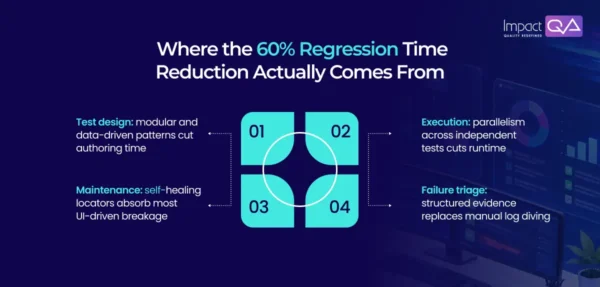
Sixty percent works best as an engineering target tied to a measured baseline. The result becomes easier to quantify when design, execution, maintenance, and triage each have their own starting point and improvement plan.
Consider a six-hour regression cycle:
Phase |
Starting Time |
Illustrative |
Automation Testing |
| Test design | 1.5hr | 0.7hr | 0.8hr |
| Execution | 2.5hr | 0.8hr | 1.2hr |
| Maintenance | 1.5hr | 0.5hr | 1.0hr |
| Failure Triage | 1.0hr | 0.4hr | 0.6hr |
| Total | 6.0hr | 2.4hr | 3.6hr/ 60% |
This is an illustrative model, not an industry benchmark. Its purpose is to show where a 60% outcome can come from: several moderate gains working together.
Current market data supports the broader direction. Katalon’s 2025 research reports 36% of respondents seeing positive ROI from their testing initiatives, including 21% reporting significant ROI.
BrowserStack’s 2026 research reports 18% of organizations achieving returns above 100%, with organizations that have used AI in testing for more than four years 83% more likely to reach that level.
So the useful question becomes very practical: Where does your six hours go?
Once the answer is visible, the 60% target becomes a calculation rather than a marketing slogan.
How AI-Powered Functional Testing Services Change the Picture
AI is changing functional testing by moving automation beyond simply executing predefined test cases. AI-powered functional testing services can help teams generate test scenarios from requirements, identify high-risk areas for regression, adapt to application changes, and analyze failures with less manual effort.
The real value comes when these capabilities work across the complete testing lifecycle. Test generation can accelerate design, intelligent test selection can reduce unnecessary execution, self-healing capabilities can reduce maintenance, and AI-assisted failure analysis can shorten triage.
This does not eliminate the need for functional testing expertise. It changes where that expertise is applied. Teams can spend less time maintaining repetitive checks and more time validating complex business workflows, edge cases, and quality risks.
ImpactQA combines AI-powered test generation, visual validation, and risk-based regression optimization.
Final Say
The 60% figure holds up when it’s traced back to specific phases, mainly maintenance and test design, the layers that carry the real weight in a blanket reduction claim. Execution speed is the easiest thing to demo and the smallest lever in most mature suites.
The architecture underneath a functional testing framework, how tests are designed, how elements get located, how failures get reported, determines whether an AI feature added later actually compounds an existing advantage or just automates an already slow process faster.
For organizations evaluating a functional testing company, the key is therefore how effectively functional coverage, test architecture, regression execution, maintenance, and failure analysis work together.
Download the full case study and see how it works in action.
Frequently Asked Questions (FAQs)
Share this post


Related Posts
Our Case Studies