Quick Summary:
Mobile applications expose security risks through more than their user interface. Local data, APIs, authentication, network traffic, platform services, and third-party integrations all need validation. Android and iOS also create different testing priorities because their security architectures differ. This guide examines the major Android and iOS vulnerabilities, cross-platform controls, API risks, AI-driven security testing, and the factors to consider when selecting mobile security testing services.
Table of Contents:
- Introduction
- What Is Mobile Application Security Testing?
- 5 Android Vulnerabilities to Test For
- 5 iOS Vulnerabilities to Test For
- Android vs. iOS: Where Security Testing Priorities Differ
- What Should Cross-Platform Mobile Security Testing Cover?
- Why API Security Testing Is Central to Mobile App Security
- How AI Is Changing Mobile Application Security Testing
- Final Say
- Frequently Asked Questions
Mobile applications now handle everything from payments and digital banking to healthcare, shopping, and enterprise access. In other words, they carry a lot more than just your shopping cart. That makes security testing essential for checking whether an app can protect its data in the real world.
Android and iOS take different routes to application security. Android testing often means looking closely at exported components, intents, permissions, WebView, and local storage. iOS testing brings its own checklist, including Keychain, entitlements, URL handling, App Transport Security, and application integrity.
Different platforms, different rules, different ways for things to go sideways.
This article explores the key areas of mobile application security testing across Android and iOS, compares their testing priorities, explains the role of API and AI-driven security testing, and highlights what to consider when choosing a security testing services partner.
ImpactQA helps you test application security across Android, iOS, APIs, and devices so you can release with confidence.
What Is Mobile Application Security Testing?
Mobile application security testing identifies weaknesses that could expose data, bypass controls, manipulate application behavior, or compromise connected services. It examines the mobile client and the systems that support it.
The testing scope commonly includes:
- Authentication and authorization
- Local data storage
- Cryptography and key management
- API communication
- Network security
- Platform permissions
- Application integrity
- Reverse engineering resistance
- Privacy controls
- Runtime behavior
OWASP places these areas into dedicated control groups within MASVS. Its testing guidance also recognises the importance of device storage and network protection in mobile environments.
5 Android Vulnerabilities to Test For
Android security testing needs a strong focus on application components, permissions, storage, intents, and platform services. Android’s ecosystem also introduces substantial device and OS variation, which makes platform-specific validation important.
1. Exported Components and Intent Abuse
Android applications use Activities, Services, Broadcast Receivers, and Content Providers to perform and share functionality.
Security testing should verify which components are externally accessible and whether an untrusted application can invoke a sensitive function through an exported component or manipulated intent.
Test scenarios should cover:
- Exported Activities and Services
- Broadcast Receivers
- Content Providers
- Intent redirection
- Deep links
- Unauthorized component access
2. Insecure Local Storage and Backup Exposure
Sensitive information can reside in SharedPreferences, SQLite databases, files, caches, logs, or backup data.
Testers should inspect stored credentials, session tokens, personal information, keys, and business data, then verify the protection applied to each storage mechanism.
3. WebView Security
WebView creates a bridge between native application functionality and web content.
Security testing should examine JavaScript execution, JavaScript interfaces, URL handling, file access, mixed content, and untrusted content loading. Poorly controlled WebView behaviour can expose application functionality to web-originated threats.
4. Permission and Deep-Link Misconfiguration
Android permissions determine access to sensitive device capabilities, while deep links can trigger application functionality from external sources.
Testing should verify runtime permissions, custom permissions, deep-link parameters, redirects, and the application’s response to malformed or unexpected input.
5. Cryptographic and Keystore Controls
Security testing should examine how cryptographic keys are generated, stored, accessed, and rotated.
Hard-coded secrets, weak encryption choices, improper key storage, or incorrect use of the Android Keystore can undermine otherwise sound security controls.
5 iOS Vulnerabilities to Test For
iOS introduces a different set of priorities. Testing should examine Keychain usage, App Transport Security, URL handling, entitlements, extensions, and runtime integrity.
1. Keychain and Sensitive Data Exposure
The Keychain is designed for protecting secrets such as credentials, tokens, and cryptographic material.
Testing should verify what the application stores, which accessibility settings it uses, and whether sensitive information appears elsewhere in logs, caches, files, screenshots, or application containers.
2. App Transport Security and TLS Configuration
Network security testing should examine HTTPS enforcement, certificate validation, TLS configuration, and any App Transport Security exceptions.
Unnecessary exceptions deserve particular attention because they may weaken protections intended to secure application traffic.
3. URL Schemes and Universal Links
Custom URL schemes and Universal Links connect external content with application functionality.
Testers should examine parameter handling, authentication flows, redirects, and whether a crafted link can trigger privileged application behaviour without the required validation.
4. Entitlements, Extensions, and Shared Data
iOS entitlements control access to platform capabilities and shared resources.
Security testing should examine App Groups, extensions, shared containers, pasteboard access, and privacy permissions to verify that application components expose only the intended functionality and data.
5. Runtime Integrity and Jailbreak Scenarios
A compromised device changes the security assumptions around application execution.
Testing can include jailbreak scenarios, runtime manipulation, debugging exposure, tampering, certificate-pinning behaviour, and controls surrounding sensitive functions.
Android vs. iOS: Where Security Testing Priorities Differ
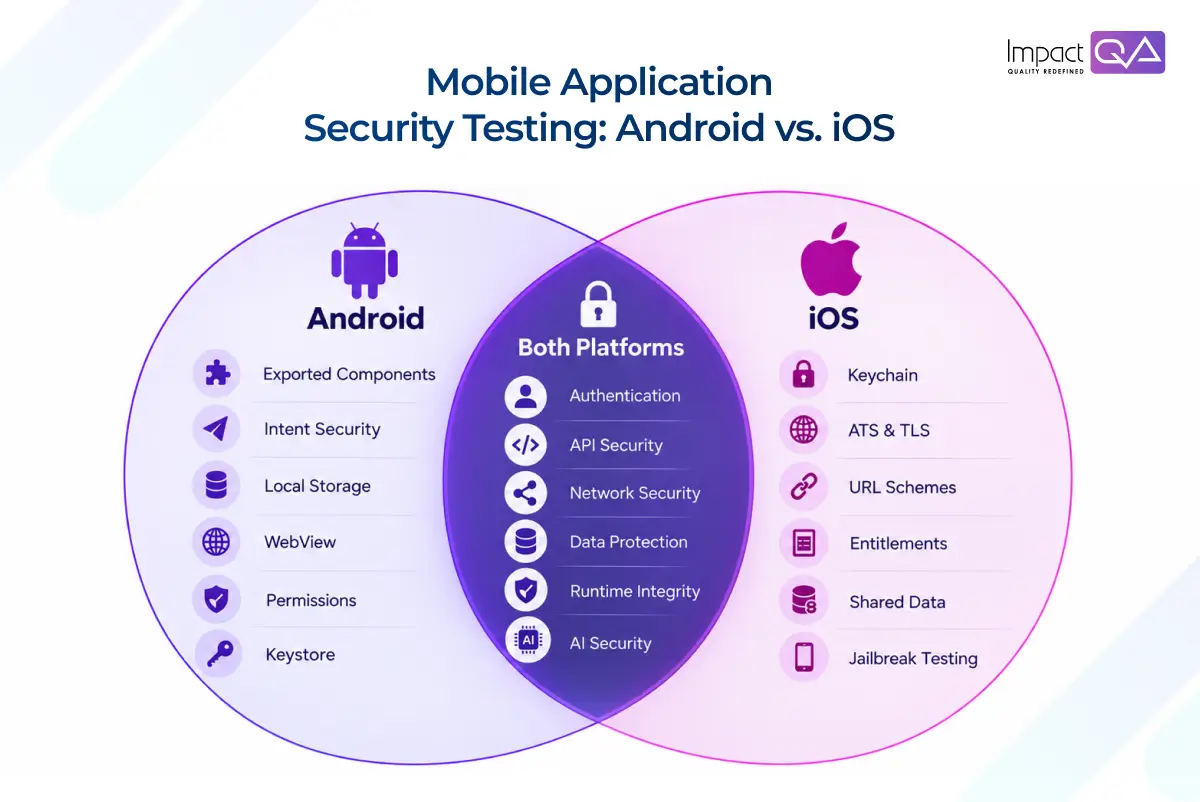
The core security objectives are similar across both platforms. The controls and attack surfaces are different.
Security Area |
Android Focus |
iOS Focus |
| Application components | Activities, Services, Receivers, Providers | App lifecycle, extensions, entitlements |
| Local data | Shared Preferences, SQLite, files, backups | Keychain, app containers, protected data |
| App-to-app communication | Intents, deep links, IPC | URL schemes, Universal Links |
| Web content | WebView configuration | WKWebView interactions |
| Platform Controls | Permissions, Keystore | Entitlements, Keychain, Data Protection |
| Compromised devices | Rooted-device testing | Jailbroken-device testing |
What Should Cross-Platform Mobile Application Security Testing Cover?
Platform-specific testing works best inside a broader security strategy. This coverage gives security teams a view of how the mobile client interacts with the complete application ecosystem.
Sr. No. |
Cross-Platform Mobile Application Security Testing Coverage Area |
Inclusions |
| 1. | Authentication and Authorization | Test login, MFA, session management, token expiry, account recovery, role enforcement, and privilege boundaries. |
| 2. | Data Protection | Check encryption, local storage, sensitive logs, screenshots, clipboard exposure, and backup behaviour. |
| 3. | Network Security | Validate TLS, certificate handling, certificate pinning, proxy scenarios, and communication over untrusted networks. |
| 4. | Application Integrity | Assess reverse engineering, tampering, debugging exposure, hard-coded secrets, and runtime manipulation. |
| 5. | Device and Environment Security | Use real devices, relevant OS versions, different network conditions, and compromised-device scenarios where appropriate. |
Why API Security Testing Is Central to Mobile Application Security?
A mobile application inherits security risk from the APIs behind it. API security testing therefore examines authentication, authorization, input handling, token management, data exposure, rate controls, and error handling to confirm that backend services enforce security independently of the mobile interface.
A polished mobile interface can still expose sensitive functionality through a poorly protected endpoint.
Testers should assess:
- Broken access controls
- Excessive data exposure
- Token manipulation
- Input validation
- Rate limiting
- Session handling
- API enumeration
- Error-message leakage
The existing mobile-security framework similarly treats API security as a core testing area because application controls cannot compensate for weak backend authorization.
How AI Is Changing Mobile Application Security Testing?
AI security testing tools are starting to change how teams triage risk, not just how fast they run scans. Analyzing execution history and defect patterns lets tools flag which areas of a build actually deserve a closer look, a meaningfully different exercise than running the same fixed suite on every release.
Two newer categories are worth watching separately. AI and LLM security testing covers apps that connect to model APIs and retrieval systems, where prompt handling and sensitive-data exposure introduce risks a traditional checklist was never built for. Agentic AI security testing goes a step further: once an app can hand off tools, permissions, and decisions to an autonomous agent, every one of those actions needs its own validation path.
Mobile security and AI security testing are starting to overlap here, and that overlap is only going to widen.
ImpactQA combines AI-driven testing with expert validation to assess functionality, security, and AI-enabled workflows.
Final Say
Mobile security is shaped by the boundaries around the application. Those boundaries include the device, operating system, APIs, networks, authentication systems, and external services.
The strongest testing strategy treats those boundaries as one connected environment (as stated in the introduction). It uses platform-specific checks to find weaknesses that generic validation can be missed.
As mobile applications adopt AI and autonomous capabilities, security testing will gain new dimensions. The engineering principle stays the same: test the behavior that matters in the environment where the application will actually operate.
Download the full case study and see how it works in action.
Frequently Asked Questions (FAQs)
Share this post


Related Posts
Our Case Studies