Quick Summary:
Mobile app performance testing gives QA and engineering teams a controlled way to study what happens when a real application meets real demand. A useful program connects device coverage with workload modelling, network conditions, backend behaviour and production telemetry.
This article focuses on six practices that make performance testing more actionable: choosing representative devices, modelling realistic load, reproducing network conditions, monitoring the complete stack, establishing measurable baselines, and using automation with AI-assisted analysis.
Table of Contents:
- What Is Mobile App Performance Testing?
- 6 Best Practices for Mobile App Performance Testing
- Tools for Mobile App Performance Testing
- Final Say
- FAQs
A mobile app lives in a demanding environment.
Users switch between Wi-Fi and cellular networks. Devices carry different processors, memory configurations, OS versions, screen sizes, and battery conditions. Then comes the traffic spike. A product launch, ticket sale, banking deadline, food-delivery rush, or streaming event can suddenly push an application’s infrastructure far beyond its everyday workload.
That’s why you need a thorough mobile app performance testing.
Performance testing examines how an app behaves under realistic workloads and resource conditions, giving QA teams visibility into response time, throughput, stability, resource consumption, and scalability. And as mobile products become more connected to APIs, cloud services, payment gateways, analytics platforms, and third-party systems, the performance conversation increasingly extends beyond the app interface itself.
What Is Mobile App Performance Testing?
Mobile app performance testing evaluates how an application behaves as workload, device conditions and system demand change.
The application itself is one part of the picture. Performance can depend on the API layer handling requests, database response, cloud resources, network quality, third-party integrations and the mobile device executing the experience.
Consider a digital banking journey. Login may complete quickly with a small test set. Increase authentication traffic, add transaction requests and introduce network latency, and the performance profile can shift. A mobile screen may appear responsive while an API behind it is approaching saturation.
That is why experienced QA teams trace the complete transaction path rather than treating the mobile interface as an isolated component.
Production telemetry adds another layer of evidence. Android Vitals currently tracks signals including user-perceived crash rate, ANR rate and memory behaviour. Google’s current Play guidance lists bad-behaviour thresholds of 1.09% for user-perceived crash rate and 0.47% for user-perceived ANR rate overall, with separate per-device thresholds. These are Google Play quality thresholds, so teams should use their own product requirements to establish engineering targets.
Apple’s MetricKit also continues to evolve. Apple’s June 2026 updates introduced MetricManager, daily MetricReport data, event-based DiagnosticReport data and state-contextualized performance reporting.
The larger point is useful for QA: controlled tests can show how an application behaves under a defined condition, while production telemetry can show how often similar behaviour appears in the field.
6 Best Practices for Mobile App Performance Testing
A strong performance strategy starts before the load generator runs.
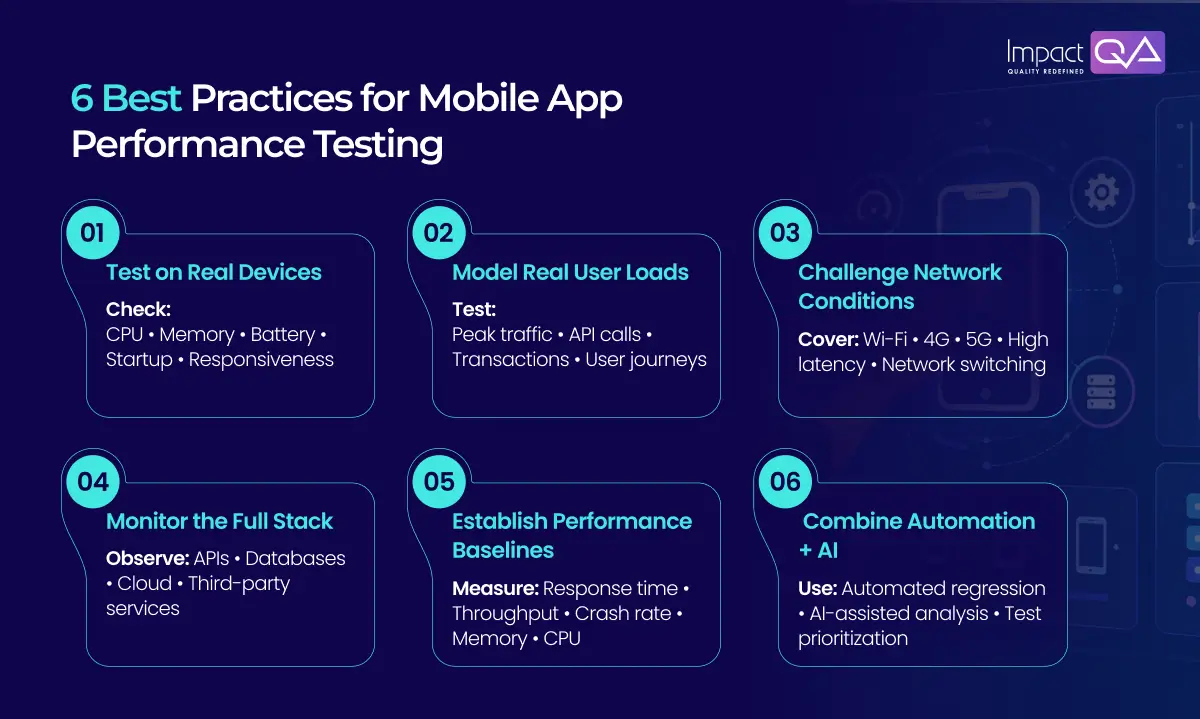
The six practices below focus on the decisions that determine whether a test produces evidence a release team can actually use.
1. Build a Device Matrix That Reflects Your Users
Real-device testing matters because hardware changes the performance picture.
A device with limited memory may expose an issue that stays hidden on a newer handset. A different chipset can alter rendering behaviour. Battery state, background activity and OS version can also influence what the user experiences.
The challenge for a QA manager is deciding which devices deserve priority.
Use production analytics as the starting point. Map active device models against supported operating systems, customer regions and business-critical journeys. Then weight the matrix according to usage and risk.
For example, a retail application may need heavier scrutiny around checkout on high-volume devices. An enterprise application could place greater emphasis on managed-device configurations.
Physical devices should carry the critical scenarios. Emulators still have a role for broader early coverage and rapid diagnosis.
Platform differences matter beyond performance as well. Teams that run broader mobile application security testing services need to consider how Android and iOS expose different technical conditions. Our article on iOS vs. Android vulnerabilities in mobile application security testing explores those differences in detail.
2. Model Demand as Users Would Generate It
A load test becomes useful when its workload represents the system you’re trying to understand — how users arrive, how long sessions stay active, and which requests repeat.
Gatling distinguishes between open workloads (controlled arrival rate) and closed workloads (controlled concurrent users); the model should reflect the live system, since a mismatch can change the result substantially. Data distribution matters too. A repetitive dataset can make the test environment unrealistically friendly.
Avoid treating average response time as the headline metric. Averages smooth out the edges; percentiles expose them. A p95 shows what most users experienced; a p99 reveals a smaller population facing a much longer delay — the number worth carrying into a go-live conversation.
3. Recreate the Network Before You Judge the App
Mobile networks have their own performance story. A test run over stable Wi-Fi tells you far less than one run through changing cellular conditions.
Build scenarios around the environments that matter: introduce latency deliberately, vary bandwidth, and test the handoff between networks where the journey depends on session continuity. Then watch what happens when the app has to wait. A single slow request can turn into several once retry logic fires, adding backend pressure exactly when the system is already under strain.
Firebase Performance Monitoring captures network request traces such as response time, payload size, filterable by device and OS. That data closes the loop: a controlled test reproduces the condition, and telemetry shows how common it is in the field.
4. Trace the Transaction Through the Whole Stack
A mobile screen is often the last visible step in a longer transaction. A payment journey shows a button press and a confirmation, but underneath, the app calls an API, triggers service logic, accesses a database, and waits on an external provider.
The test should show where that time accumulated: client response time and API latency viewed together, then service response, database timing, and infrastructure behaviour where the architecture exposes them.
A four-second screen load has several possible explanations: slow client rendering, a downstream service the API is waiting on, an expensive database query, or a slow third-party endpoint. The goal is pinpointing the bottleneck precisely enough for the right team to act.
5. Establish Baselines That Can Drive Release Decisions
A performance result becomes meaningful when you can compare it. Start with a build that represents an accepted level of performance, record the measurements that matter to critical journeys, and evaluate future runs against that reference rather than memory or intuition.
A useful baseline might compare the same payment flow on the same device under the same load; consistency is what makes it usable.
Define thresholds before the release cycle gets busy. A critical API staying below an agreed p95 latency, a crash or ANR ceiling on a priority device, a memory-growth cap on an endurance run, set from product requirements and technical constraints, not after the fact.
That turns the release conversation concrete: what changed, where, and does it cross the agreed threshold — a stronger basis than a pass/fail label.
6. Automate Repeatable Tests, Then Let AI Help With the Analysis
Automation earns its place when the same quality question needs answering repeatedly: critical journeys scheduled alongside builds, load scenarios reused, results stored for comparison. A check that has to be rebuilt manually every release quickly becomes unsustainable.
AI adds another layer. Performance platforms are starting to use it for result analysis, trend comparison, and test creation. The value is cutting the time it takes to interpret large volumes of execution data. Before adopting AI tools for mobile app testing, it’s worth asking: can it identify changes across runs, highlight patterns worth investigating, and help prioritise scenarios after a change?
The important thing is restraint. AI mobile app testing can reduce investigation effort. QA still decides what the result means for the product.
ImpactQA’s current AI-led Quality Engineering positioning similarly uses AI for risk analysis, intelligent test selection, continuous validation and predictive quality analysis. Our 2026 article on how AI is revolutionizing mobile application testing services goes further into AI-assisted test generation, adaptive automation and predictive performance analysis.
Tools for Mobile App Performance Testing
The right mobile app testing software depends on the layer under examination.
S. No. |
Tool |
Primary Role |
| 1. | Gatling | Workload modelling and high-scale load execution |
| 2. | Appium | Mobile UI automation |
| 3. | Android Studio Profiler | Android resource and runtime profiling |
| 4. | Xcode Instruments / MetricKit | iOS profiling and production diagnostics |
| 5. | Firebase Performance Monitoring | Real-user performance telemetry |
| 6. | Apache JMeter | Protocol-level and backend load testing |
Final Say
Performance testing gets interesting when the numbers start explaining the product. A response time changes — the question becomes why. A device shows memory growth, the question is whether it shows up elsewhere. A release holds steady under expected traffic, then shows elevated latency near the peak: a capacity signal, not just a speed one.
That’s the level at which performance testing becomes useful for business decisions, evidence engineering can act on, and QA can defend. As mobile products keep adding dependencies, that discipline only gets more valuable.
ImpactQA combines mobile app performance testing, device coverage, automation and broader mobile application testing services to help teams validate mobile products under the conditions that matter to real users.
Frequently Asked Questions (FAQs)
Share this post


Related Posts
Our Case Studies