Quick Summary:
The OWASP Mobile Top 10 checklist turns each risk into practical tests for iOS and Android, then shows where automation and AI can extend coverage across the release cycle. For 2027 planning, teams should use the Top 10 as the risk baseline and supplement it with the latest OWASP Mobile Application Security Verification Standard (MASVS), Mobile Application Security Testing Guide (MASTG), and Mobile Application Security Weakness Enumeration (MASWE).
Table of Contents:
- Introduction
- What Is the OWASP Mobile Top 10?
- Why Mobile Security Testing Priorities Shift in 2027
- The OWASP Mobile Top 10 Security Testing Checklist
- Where AI and Automation Fit in Mobile Application Security Testing
- Choosing Mobile Application Security Testing Services
- Final Say
- FAQs
Every mobile app ships with a second document inside it, one its authors rarely read again: the strings, endpoints and keys compiled into the binary, waiting on millions of phones for anyone patient enough to unpack them. Attackers read that document first. Verizon’s 2025 Mobile Security Index found that 85% of organizations saw mobile attacks rise over the past year, and 75% increased mobile security spending in response.
The OWASP Mobile Top 10 gives security and QA teams a common way to turn that attack surface into release-level checks. The 2024 edition remains the current list heading into 2027 planning. This checklist turns each of its ten risks into tests your mobile app testing program can run on every release.
What Is the OWASP Mobile Top 10?
The OWASP Mobile Top 10 is a community-ranked list of the most critical security risks in iOS and Android applications, published by the Open Worldwide Application Security Project. The current edition, released in 2024, reorders the list around credentials and the software supply chain, reflecting how modern apps are assembled from SDKs and APIs.
The Top 10 tells teams what to look for. OWASP’s Mobile Application Security Verification Standard (MASVS) and its companion testing guide (MASTG) supply the detailed test cases behind each item.
The current 2024 list includes:
S. No. |
OWASP Risk |
What Testing Should Examine |
| 1. | M1. Improper Credential Usage | Credentials, API keys, tokens, and secrets |
| 2. | M2. Inadequate Supply Chain Security | Third-party libraries, SDKs, and dependencies |
| 3. | M3. Insecure Authentication/Authorization | Login, session control, roles, and permissions |
| 4. | M4. Insufficient Input/Output Validation | Untrusted data entering or leaving the application |
| 5. | M5. Insecure Communication | Network traffic, TLS, certificates, and trust validation |
| 6. | M6. Inadequate Privacy Controls | Permissions, tracking, consent, and personal data |
| 7. | M7. Insufficient Binary Protections | Reverse engineering and application tampering |
| 8. | M8. Security Misconfiguration | Unsafe application and platform settings |
| 9. | M9. Insecure Data Storage | Local files, databases, logs, caches, and backups |
| 10. | M10. Insufficient Cryptography | Encryption, key management, hashing, and cryptographic implementation |
Attackers are using AI to scale mobile phishing and app abuse, and breach costs have turned every escaped vulnerability into a board-level number.
Verizon’s 2025 Mobile Security Index reports that more than three in four organizations expect AI-assisted threats such as SMS phishing and deepfakes to succeed, while 17% have deployed controls built specifically for AI-assisted attacks. The budget is in place: 89% of organizations now hold a dedicated mobile security budget.
IBM’s 2025 Cost of a Data Breach Report found that organizations making extensive use of AI in security saved an average of $1.9 million per breach compared with organizations with lower levels of AI adoption.
Everyone budgeted for faster mobile releases. What matters more is how much attack surface now ships with each build. Our earlier look at why mobile application security testing belongs in every app launch covers the release-gate case in detail.
The OWASP Mobile Top 10 Security Testing Checklist
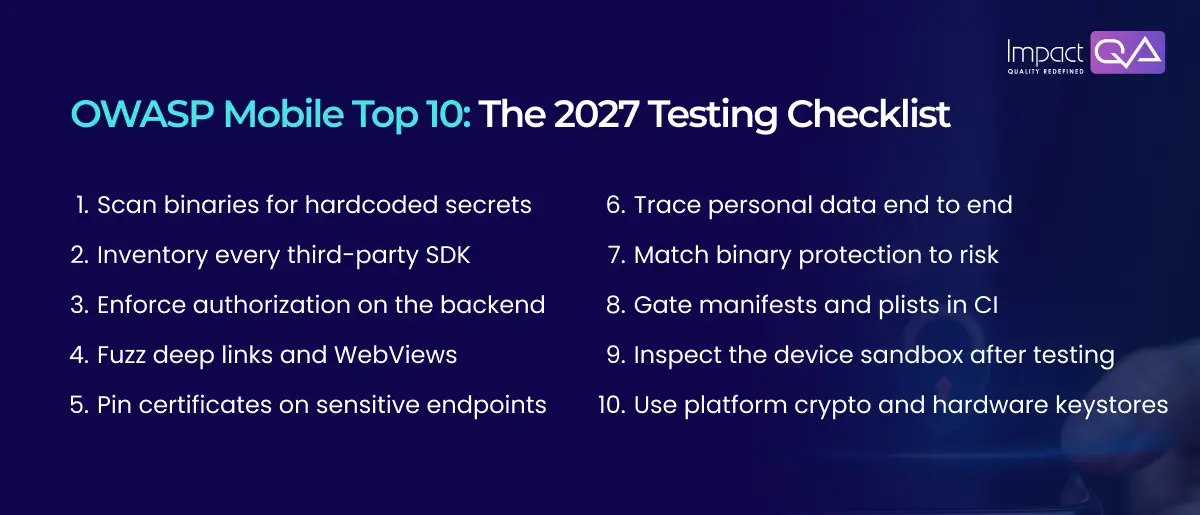
Each item below names the risk, the mechanism behind it, and the tests that cover it on iOS and Android.
Checklist #1: Improper Credential Usage (M1)
Review compiled artifacts and bundled resources for hardcoded credentials, API keys, tokens, and secrets. Use static analysis and secret-scanning tools, then verify how sensitive credentials are generated, stored, scoped, and rotated.
Platform-protected storage such as iOS Keychain and Android Keystore should be evaluated where appropriate to the credential type and threat model.
Checklist #2: Inadequate Supply Chain Security (M2)
Inventory third-party SDKs and dependencies for every release. Maintain an SBOM, monitor dependency vulnerabilities, and verify the integrity of build artifacts.
Security testing should also examine SDK permissions and the data they collect, not just whether a dependency has a known CVE.
Checklist #3: Insecure Authentication/Authorization (M3)
Client-side controls should never be the final authorization layer.
Replay API requests with altered user IDs, roles, tokens, and permissions to verify that the backend enforces access rules. Test session expiry, token reuse, account recovery, and offline authentication paths.
Checklist #4: Insufficient Input/Output Validation (M4)
Deep links, WebViews, exported Android components, and external inputs can introduce unexpected attack paths.
Fuzz parameters with malformed and unexpected values. Test WebView bridges for unsafe JavaScript interaction and verify that external input cannot trigger unauthorized application behavior.
Checklist #5: Insecure Communication (M5)
Inspect TLS configuration, certificate validation, cleartext traffic, and platform security exceptions.
Certificate pinning can be evaluated for sensitive use cases, but it should be treated as a threat-model decision rather than a universal requirement. Test failure and certificate-rotation behavior as part of the assessment.
Checklist #6: Inadequate Privacy Controls (M6)
Trace personal data from collection through processing, analytics, storage, and deletion.
Review permissions against actual application behavior and inspect logs, analytics SDKs, crash reports, and third-party services for unintended data exposure. On iOS, review privacy manifests and third-party SDK declarations.
Checklist #7: Insufficient Binary Protections (M7)
Match application protection to risk. Higher-risk applications may require obfuscation, anti-tampering controls, and runtime protections.
Test release builds through reverse engineering, repackaging, and runtime instrumentation to determine whether security controls can be bypassed.
Checklist #8: Security Misconfiguration (M8)
Review AndroidManifest.xml, Info.plist, build configurations, exported components, backup settings, debugging options, and unnecessary permissions.
These checks are highly repeatable, making them strong candidates for CI pipeline gates.
Checklist #9: Insecure Data Storage (M9)
Inspect application storage after realistic user journeys. Look for tokens, credentials, personal information, and sensitive business data in local databases, files, logs, caches, and backups.
Test storage on appropriately controlled rooted or jailbroken devices where the assessment requires it.
Checklist #10: Insufficient Cryptography (M10)
Review algorithms, key generation, key storage, hashing, random-number generation, and cryptographic implementation.
Flag deprecated algorithms and weak implementations. Prefer established platform cryptographic libraries rather than custom cryptographic code.
Where AI and Automation Fit in Mobile Application Security Testing
Deterministic checks belong in every build. AI earns its place in exploration and triage.
Mobile app automation testing handles the deterministic risks well. Secret scans and manifest reviews give the same answer every run, so they work as pipeline gates alongside functional suites. Mobile App automated testing services that run these gates on a real-device farm give each release a security record.
AI mobile app testing extends coverage further. AI tools for mobile app testing can explore UI flows to reach screens deep inside onboarding and generate fuzz inputs for deep links. The same models help with triage by grouping duplicate findings across iOS and Android builds. Self-healing locators keep those flows running as screens change, a technique we unpack in our analysis of self-healing frameworks.
Pairing mobile app testing software with test automation services keeps security evidence attached to every release, and IBM’s $1.9 million average saving for AI-heavy security operations gives the business case its anchor.
Choosing Mobile Application Security Testing Services
The strongest providers map findings to OWASP standards and test on real devices across both platforms. Put four questions to any provider of mobile application testing services:
- Are findings mapped to the Mobile Top 10 and MASVS controls?
- Does testing run on real iOS and Android devices alongside emulators?
- How quickly are fixes retested after a finding?
- Can security checks run inside our CI pipeline?
Independent assessment carries extra weight in regulated sectors. ImpactQA’s VAPT engagement for a UK-based institutional liquidity provider shows how it supports audit expectations in financial services.
Final Say
Mobile security testing heading into 2027 belongs inside the release pipeline, with the OWASP Mobile Top 10 as its shared checklist and MASVS supplying the detailed controls. Investment is moving toward programs that pair deterministic build gates with AI-assisted exploration, and Verizon’s finding that 75% of organizations raised mobile security spending shows the budget is already there.
ImpactQA brings this into engagements through mobile application testing services that cover Android and iOS on real devices, paired with independent security testing and VAPT. AI-enabled automation then carries OWASP-mapped checks into every build, backed by more than 12 years of Software Testing Services delivery.
Frequently Asked Questions (FAQs)
Share this post


Related Posts
Our Case Studies