Quick Summary:
Migrating to AI-powered test automation starts with auditing manual test cases, prioritizing stable workflows and setting performance baselines. Teams then build an automation-ready framework, establish reliable test data and integrate regression testing into CI/CD pipelines. Once the framework is stable, AI capabilities such as self-healing locators, intelligent test selection, automated test generation and agentic exploration help reduce maintenance effort. Continuous measurement and human oversight keep automation reliable as coverage scales.
Table of Contents:
- Introduction
- A 7-Step Migration Plan for AI-Powered Automation Testing
- 6 Metrics That Track Migration Progress
- Final Say
- FAQs
Enterprise releases now go out in days. The regression suite behind them gets bigger every sprint, and much of it is still run by hand. The World Quality Report 2025-26 says automation reaches only about a third of test cases on average. It also reports a 19% average productivity gain from generative AI in quality engineering, yet only 15% of organizations have managed to scale AI across the enterprise.
Why are so few organizations able to scale AI-powered test automation? We would argue that the order of implementation has a lot to do with it. As your application grows, so does its regression suite. The same is true with test automation and your infrastructure. AI-powered test automation can repair broken locators and prioritize testing based on change risk. Automate too much of what changes, or use AI to automate cases your team can’t figure out, and you increase the amount of maintenance work. Taking this migration in stages allows us to measure progress at each point.
A 7-Step Migration Plan for AI-Powered Automation Testing
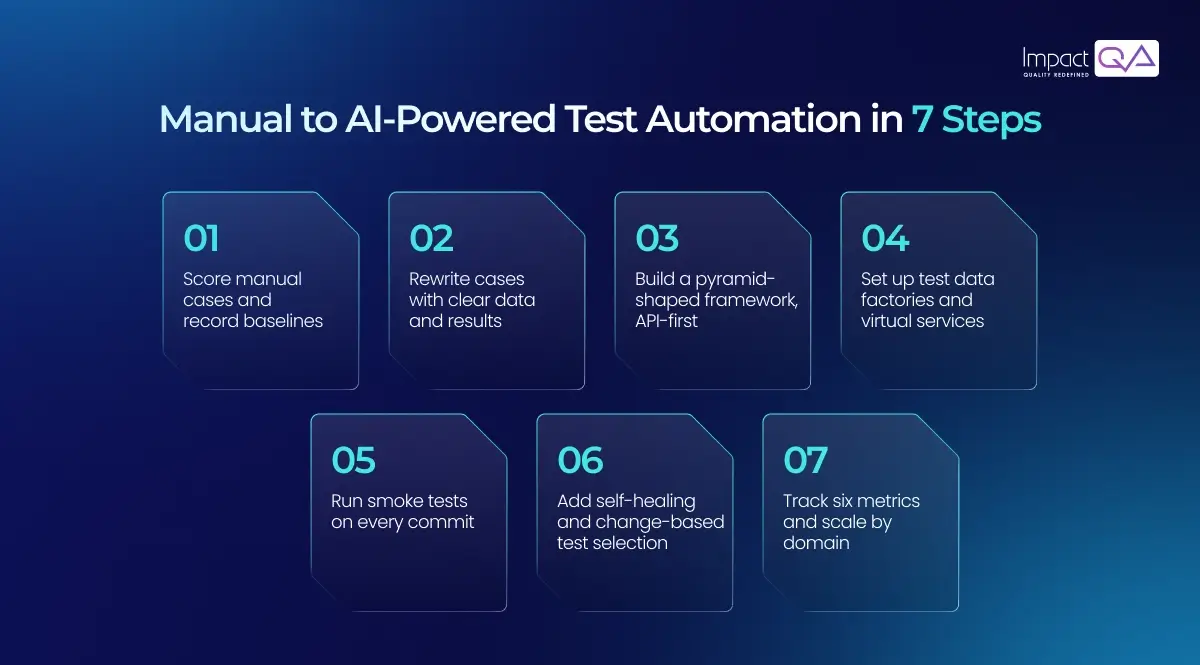
Think of these steps as a chain. Each one hands something to the next, and the AI capabilities in Step #6 lean on everything before them, which is why skipping ahead usually means coming back to redo work later.
Step #1: Audit the Manual Suite and Set Baselines
First, you need to know what you actually have. List every manual case and tag it for how often it runs, how much the business depends on it, how stable it is and what data it needs. Then rank the list with a simple score:
Automation score = (Run frequency × Business criticality × Stability) ÷ Setup effort
Give each factor a rating from 1 to 5. A 5 should mean better for automation: the case runs often, matters to the business, behaves consistently. Setup effort works the other way, so a hard-to-automate case drops down the list. Data dependency isn’t scored at all. We keep it as a tag because it shows which cases need extra work in Step #4. The score is only a guide, so override it when your team’s experience indicates otherwise. You’ll probably see login, checkout and payment posting near the top. Anything near the bottom can stay manual for now.
One more thing before anyone writes a script. Note down your regression cycle time, defect escape rate and effort per regression run, because every later step gets judged against these three baselines.
ImpactQA brings AI for automation testing into the framework you already run.
Step #2: Rewrite Cases into Automation-Ready Form
The best way to learn this step is to follow along as more experienced testers demonstrate how they run a case. These demonstrations typically involve details such as which account to use, what an “acceptable” or “correct” screen looks like, or how a user interacted with the system. A script has none of that context.
So write it in. Give cases preconditions, objectives, and expected results. Include all the data a test needs to run within the test case. Clear preconditions and objectives should make test execution deterministic. Tests can then be run independently of one another and in any order. Gherkin’s ‘Given, When, Then’ syntax is a popular example of this structure. This groundwork is what building the right foundation for test automation looks like in practice.
Step #3: Design the Framework Around the Test Pyramid
Follow the test pyramid. Most of your checks belong at the unit and API layers, fewer at integration, and only a thin band of end-to-end UI tests at the top, because UI tests are the slowest to run and the first to break. People do mix these layers up. An API test looks at one service’s contract and logic. An integration test asks whether services and databases work together. An end-to-end test walks a full user journey through the UI.
Which tools? That depends on your stack and the programming languages your team already uses. For modern web front ends, we’d look at Playwright or Cypress. Appium is commonly used for native and hybrid mobile app testing. For API automation testing, REST Assured and Postman collections can handle authentication, schema validation and chained calls. Add a Page Object Model as well, so that common UI changes can be managed in shared page objects instead of updating multiple test scripts.
Not everyone wants to code, of course. Business testers can build flows on the Falcon no-code automation platform, ImpactQA‘s AI-driven tool, by writing steps in plain language. Self-healing and CI/CD integration come built in.
Step #4: Build Test Data and Environment Foundations
There are three main culprits of flaky tests: sharing data, order dependency, and unmanaged waits. These issues often involve test design, data management and environment configuration.
Using test data factories eliminates the shared data problem by creating fresh data for each test. For edge cases and unusual scenarios that may arise in production, synthetic data can be used. Data masking can support your HIPAA and GDPR controls, but it does not establish compliance on its own. For costly or missing dependencies in lower environments, service virtualization can be used. Containers and other similarly short-lived environments mean the beginning of each pipeline run is the same as the last, and thus you start with a clean state.
Step #5: Wire Automation into CI/CD
Tests that only run when someone remembers to start them won’t change much. Wire them into the pipeline. A typical setup runs a smoke suite on each commit, kept under ten minutes, and the full regression on each merge or overnight. As coverage grows, parallel sharding spreads the suite across workers so feedback stays quick.
Then there’s the question of what a result means. Quality gates answer that, but only if the rules are agreed up front: what pass rate is acceptable, which defect severities block a build, and when a test gets quarantined. Intermittent failures go into quarantine until someone fixes them, so they can’t hold up a healthy build in the meantime.
Step #6: Add AI onto the Stable Framework
Now AI has something solid to work with. Maintenance and test selection are the two jobs that grow fastest as a suite expands, and AI in test automation helps with both. We’d focus on four capabilities.
Self-healing locators. Say a button’s ID changes and a test breaks. The engine scores the elements around it on attributes like ID, text, position and DOM path, then proposes the best match if it clears an agreed confidence threshold. Two near-identical candidates? That goes to a person. A reviewer also has to confirm that the step still checks what it was meant to, because an incorrect match could allow a test to pass while validating the wrong element.
Change-impact test selection. Why run everything for a small pull request? Using dependency mapping, code coverage and failure history, the model works out which tests touch the changed files, so a few hundred relevant tests can run in place of the full suite. The full regression keeps its merge or overnight slot.
Test generation from requirements. Language models can draft cases from user stories and API specifications, but the review stays with testers, who know the domain edge cases a model would miss. AI-powered test case generation works best when Step #2 has already set a clean case format.
Agentic exploration. Here, AI agents move through the application on their own, log anything unexpected and turn confirmed paths into regression tests. Guardrails decide which environments, data and actions they can touch.
This combination of capabilities is commonly found in AI automation testing frameworks. Whatever the name, it depends on the clean structure from Steps #2 to #5.
Step #7: Measure, Govern and Scale
Let the numbers decide how fast you scale. Track the metrics below every sprint and add coverage one domain at a time. Governance matters here too: each AI-generated change should carry an audit trail with a named reviewer, an approval record and a way to roll it back.
People remain in charge of exploratory, usability and accessibility work, as explained in our article on why manual software testing remains essential. Automation just gives them more time for it.
6 Metrics That Track Migration Progress
Metric |
How to Calculate |
What It Shows |
| Automation coverage | Automated regression cases ÷ total regression cases | Proportion of regression test cases automated |
| Regression cycle time | Duration of one full regression run | Time required to complete regression testing |
| Defect escape rate | Production defects ÷ (pre-release defects + production defects) | How much the suite catches before release |
| Flaky test rate | Tests with inconsistent outcomes across repeated runs of the same build ÷ total tests | Suite reliability |
| Self-heal acceptance rate | AI locator fixes accepted ÷ fixes proposed | Reviewer acceptance of proposed locator fixes |
| Maintenance hours per sprint | Hours spent repairing existing tests | Effort required to keep automation current |
How do you know the migration is working? Measure these six numbers each sprint against your Step #1 baseline.
Expect automation coverage to increase and regression cycle time to decrease first. Escape rate and maintenance hours take longer, and they tell you whether the gains are holding across releases. Decide early which defect categories and release windows count. One caution on the self-heal number: a high acceptance rate doesn’t prove the repairs were right, so spot-check some accepted fixes against the original test intent.
ImpactQA runs a short automation readiness review on your current suite.
Final Say
Automation programs now judge success by how little maintenance effort a growing suite requires. AI-assisted tooling is fast becoming a standard layer of the engineering toolchain. The next stage is agentic testing, where agents propose and maintain tests under human review. Teams that finish the foundation work now will be ready for it.
For enterprises evaluating test automation companies, ImpactQA brings 150+ certified automation engineers and more than 350 domain-specific frameworks to this migration. Our automated software testing services span the full stack, API layers included, and our test data management feeds masked and synthetic datasets straight into CI/CD pipelines. With our AI-powered test automation services, AI agents support intelligent test selection and self-healing maintenance, while the FALCON platform enables codeless test creation. We’ve delivered up to an 80% reduction in regression test cycles and cut production defects by 80% with a cloud-based automation solution.
Download the full case study and see how it works in action.
Frequently Asked Questions (FAQs)
Share this post


Related Posts
Our Case Studies