Quick Summary:
Test automation turns repeatable quality checks into a dependable engineering capability. Done well, it shortens feedback cycles, expands regression coverage, and gives QA teams more time for exploratory and risk-based testing. Done badly, it creates brittle scripts that fail often and explain little.
This guide covers what test automation really means, where it delivers value, which tools fit different needs, how to start, what to measure, and where emerging AI capabilities fit into the picture.
Table of Contents:
- Introduction
- What Is Test Automation?
- Why QA Teams Invest in Test Automation: 5 Practical Benefits
- Popular Test Automation Tools and Frameworks
- How to Build a Test Automation Strategy?
- The AI Factor: Helpful Co-Pilot, Not Quality Autopilot
- Final Say
- Frequently Asked Questions
If every release requires a spreadsheet, three handovers, and a collective deep breath, then the effort is hardly an issue. It’s actually the feedback speed.
Modern QA teams must validate web apps, APIs, mobile experiences, integrations, and frequent code changes without turning every release into a manual testing marathon. Yet the average organisation has automated only 33% of its test cases, according to the World Quality Report 2025–26.
That is where test automation comes in as a dependable framework for quality feedback.
What Is Test Automation?
Test automation is a framework that uses tools, code, test data, environments, and delivery-pipeline integrations to run selected software checks consistently with minimal manual effort.
For this article, test automation means the broader quality framework (not isolated checks). A healthy framework helps teams decide what to automate, when to run it, how to investigate failures, and how to keep coverage useful as the product evolves.
Think of it this way: a script can test one path. A test automation framework creates a repeatable safety net around every meaningful release. A practical automation framework usually includes:
- Test strategy and scope
- Test design and reusable components
- Data and environment management
- Framework and tool selection
- CI/CD integration
- Reporting and failure analysis
- Ownership and maintenance
- And no, you shouldn’t automate everything.
A new feature that changes every week may be a poor automation candidate. A stable payment flow executed in every release is a much better one.
ImpactQA designs test automation frameworks that are easier to use, maintain, and extend as your product changes.
Why QA Teams Invest in Test Automation: 5 Practical Benefits
The business case for automation usually starts with one problem: repetition.
When testers spend hours rerunning the same regression pack after every build, machines can handle the predictable work while QA focuses on investigation and risk.
1. Faster Regression Cycles
Automated checks can run across builds without requiring a tester to execute every step manually. That matters when a release contains dozens of changes and the regression window hasn’t magically become longer.
2. Earlier Defect Feedback
Connect automation to CI/CD and tests can run soon after code changes.
A failure reported minutes after a commit is far more useful than a defect discovered two days before release.
3. Broader Coverage
Automation makes it easier to validate the same workflow across browsers, devices, data conditions, APIs, and integrations.
This is particularly useful for products with large compatibility matrices.
4. Better Use of QA Expertise
Nobody becomes a better tester by spending their afternoon checking whether the same login button still works for the 47th time.
Automation handles predictable repetition. QA professionals can spend more time on exploratory testing, unusual behaviour, usability, and business risk.
5. More Consistent Quality Feedback
Manual execution can vary with timing, data, and human interpretation. A well-designed automated check follows the same logic each time.
That doesn’t make automation infallible. It makes the feedback more repeatable.
Popular Test Automation Tools and Frameworks
There’s no universal winner. Choose based on application architecture, team skills, execution needs, CI/CD setup, and maintenance capacity.
Sr. No. |
Testing Need |
Common Options |
| 1. | Web applications | Playwright, Cypress, Selenium |
| 2. | Mobile Testing | Appium |
| 3. | API Testing | Postman, Rest Assured |
| 4. | BDD | Cucumber |
| 5. | CI/CD | Jenkins, GitHub Actions, GitLab CI |
| 6. | Enterprise automation | Tricentis Tosca and similar platforms |
Playwright is often attractive for modern web applications, while Selenium remains relevant for teams that value broad browser support and a mature ecosystem. Appium fits mobile scenarios; Postman and Rest Assured are common choices for service-level validation.
This is also where test automation Companies can add value when teams need specialised framework design, legacy-suite modernisation, or broader test automation services.
How to Build a Test Automation Strategy?
A strategy is where automation stops being a collection of scripts and becomes an engineering practice.
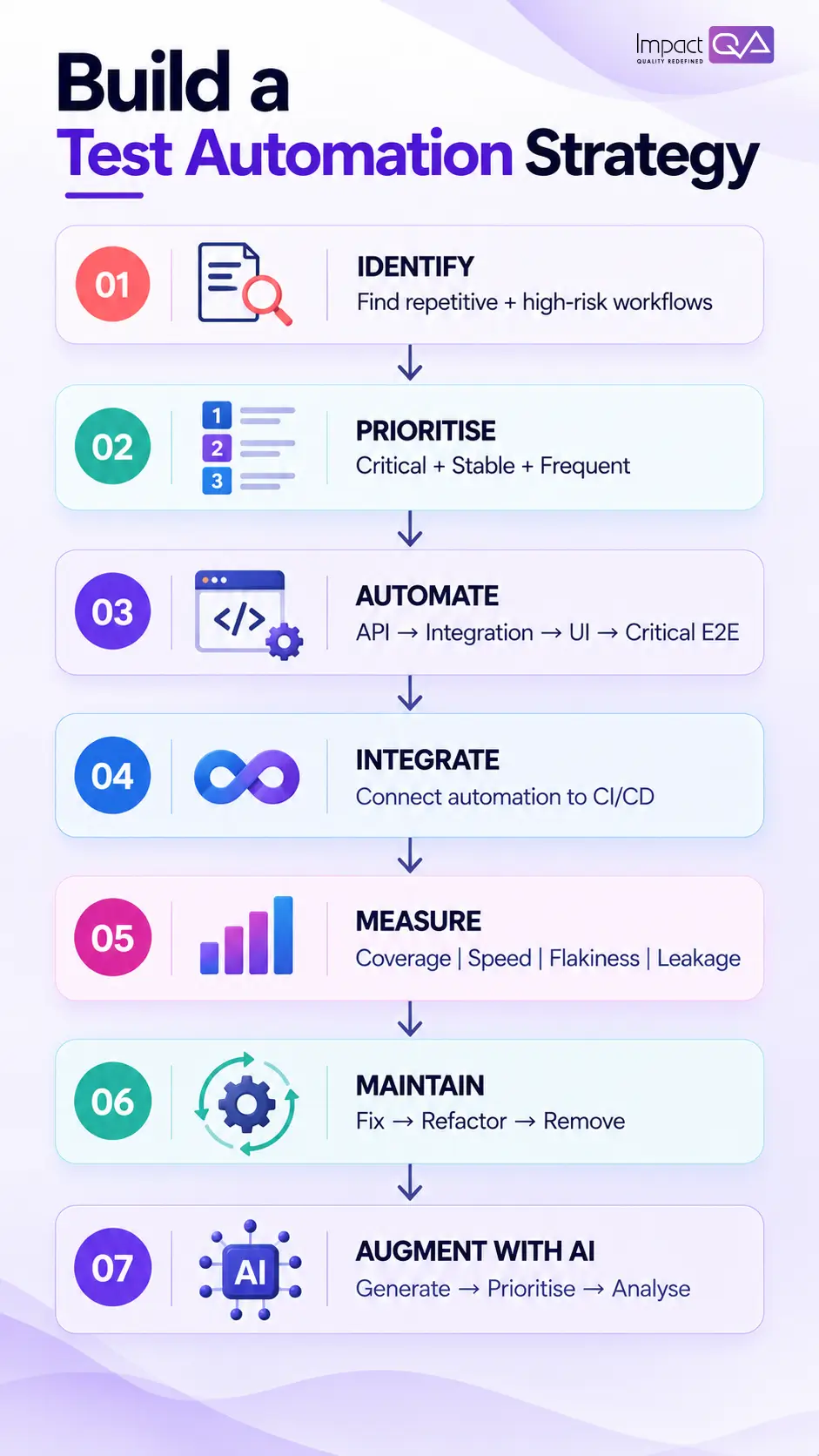
Step 1: Start With Risk, Not the Tool
Map the workflows that matter most to the business.
For an ecommerce application, checkout and payment may rank above profile settings. For a banking application, transaction processing and authentication will likely carry greater risk.
Then ask how often each scenario runs and how stable it is.
A simple prioritisation model works well:
High business risk + high repetition + stable behaviour = automate early.
Step 2: Build the Right Test Mix
Don’t make UI automation carry the entire testing burden.
A stronger model distributes checks across levels.
- API automation testing can validate business logic and service behaviour quickly.
- UI automation can protect a smaller set of critical end-to-end journeys.
- Integration tests can validate interactions between systems.
- Manual exploration can investigate areas where expected behaviour isn’t fully known.
This keeps the UI suite smaller and reduces unnecessary maintenance.
Step 3: Design for Maintainability
Your first 50 tests are easy to celebrate. Your 500th is where the architecture starts talking back.
Use reusable components, stable locators, controlled test data, clear naming, proper assertions, and meaningful error messages. Avoid hard waits wherever possible. Give the suite clear ownership.
Every test you create becomes future maintenance work.
Plan for that before the repository starts looking like a graveyard.
Step 4: Integrate Automation Into CI/CD
Fast tests should run early. Broader suites can run later in the pipeline.
For example:
Code change → Unit checks → API checks → Critical UI tests → Regression suite → Release
The exact pipeline will vary, but the principle is consistent: give developers useful feedback as early as possible.
A 20-minute test suite that runs only before release is far less valuable than a focused suite that catches defects during development.
Step 5: Measure More Than Test Count
Counting automated scripts is easy. It also tells you very little.
Track metrics that show whether automation is improving quality and delivery:
- Automation coverage: What percentage of critical scenarios are automated?
- Execution time: How long does useful feedback take?
- Flaky-test rate: How often do tests fail without a genuine product issue?
- Defect leakage: Which important defects escape despite your automated coverage?
- Maintenance effort: How much time does the team spend fixing or updating tests?
- Failure quality: Can engineers quickly understand why a test failed?
A healthy automation program should make your pipeline more trustworthy over time. If every build produces 30 failures and nobody knows which ones matter, adding another 300 tests won’t save you.
The AI Factor: Helpful Co-Pilot, Not Quality Autopilot
AI is reshaping test automation by helping teams generate scenarios, create starter scripts, identify risky changes, improve locators, and analyse failures. But faster test creation doesn’t guarantee better testing. For teams evaluating automation testing services, AI should just strengthen the testing process.
Here’s where AI in test automation is making the biggest impact:
1. AI-Assisted Test Generation
AI can turn requirements, user stories, code, and existing tests into candidate scenarios or scripts. It speeds up authoring, but QA still decides whether the generated coverage reflects real business risk.
2. Intelligent Test Prioritisation
AI can analyse code changes, test history, and past failures to identify high-risk tests first. This helps when running the full regression suite for every change isn’t practical.
3. Self-Healing Automation
When UI elements change, AI-based tools can suggest alternative locators and update test paths. This reduces maintenance, but healed tests still need review when application behaviour changes.
4. AI-Powered Failure Analysis
AI can correlate logs, stack traces, test history, and failure patterns to help identify whether an issue lies in the product, environment, or automation.
5. Agentic AI in Test Automation
Emerging AI automation testing frameworks are moving toward agents that can interpret goals, generate scenarios, execute tests, analyse results, and escalate failures.
Together, these capabilities move AI test automation from isolated assistance toward broader workflow orchestration.
ImpactQA helps you implement AI in your test automation so you can stay ahead, adapt with confidence, and keep growing.
Final Say
Good test automation earns trust. It gives developers fast feedback, gives QA teams room for deeper investigation, and gives engineering leaders a clearer view of release risk.
Start with important workflows. Keep the suite stable. Measure useful outcomes. Remove tests that have stopped earning their place. Then bring AI into the areas where it genuinely helps: generating candidates, prioritising execution, analysing failures, and reducing maintenance.
We’re already seeing AI reshape automation testing services and the way teams approach quality. The teams that benefit most won’t be the ones with the most AI features.
They’ll be the ones that know exactly where those features belong.
Get an inside look at the strategy behind the success.
Frequently Asked Questions (FAQs)
Share this post


Related Posts
Our Case Studies